October 19, 2026



 Written by Watch TV Direct
To add an M3U playlist, open your IPTV app, choose Add playlist (sometimes called M3U URL or Load playlist), paste the full link your provider sent you, give it a name and save. Channels usually appear within a minute. It works this way in TiviMate, IPTV Smarters Pro, Kodi, VLC and nearly every other player.
Where people get stuck is the link itself. One wrong character, a setting missing from the end, a TV guide that never shows up. Paste your link into the checker below and it tells you which of those you’re dealing with before you type anything on your TV. Then follow the steps for your app.
Most providers give you two ways to log in. Both open the same channels. If your app offers both, Xtream Codes is usually the easier choice.
| M3U link | Xtream Codes | |
|---|---|---|
| What you enter | One long web address | Server, username and password |
| TV guide | Usually needs a second link (EPG) | Loads automatically |
| Movies and series | Often mixed into one long list | Sorted into their own sections |
| Catch-up | Depends on the app | Supported in most apps |
| Best for | Kodi, VLC, apps without an Xtream option | TiviMate, Smarters, IBO Player Pro |
So when should you use M3U? When your app only accepts a playlist link, like Kodi or VLC, or when you want to test your service quickly. If you’re not sure what the three Xtream fields mean, our Xtream Codes guide explains them.
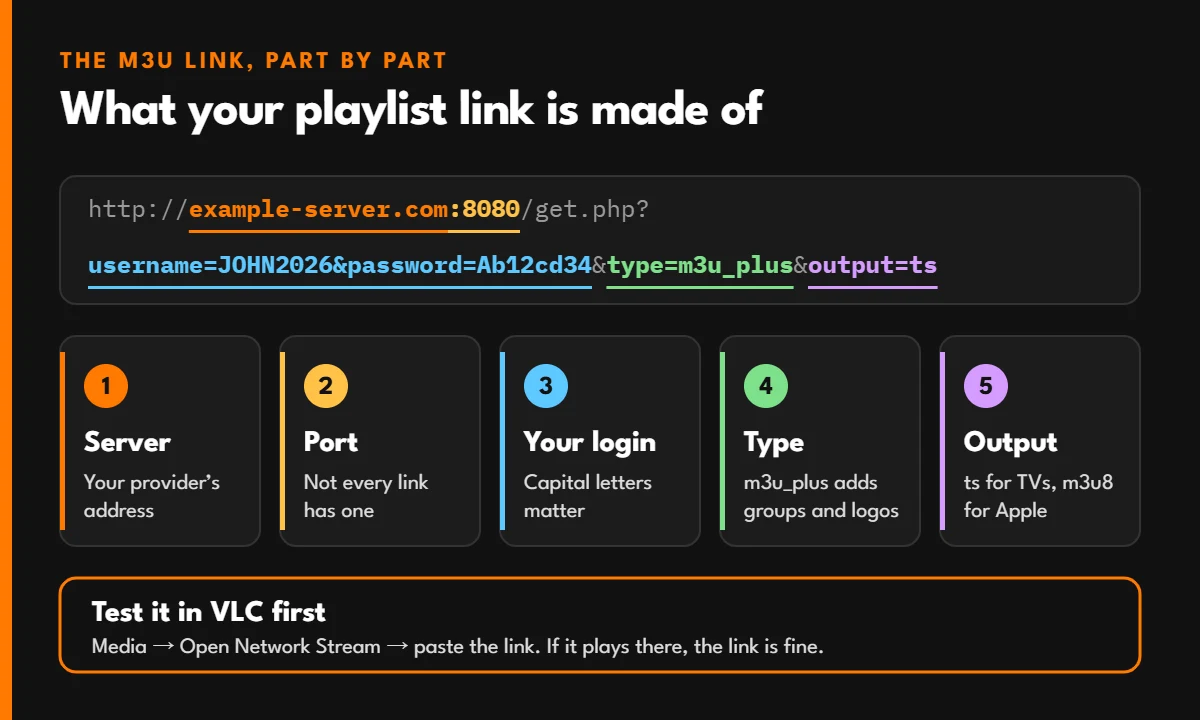
Most M3U links from IPTV providers follow the same pattern. This example uses made-up details. Yours may have no port number (the :8080 part), which is normal: many servers now run on standard web ports and leave it out.
http://example-server.com:8080/get.php?username=JOHN2026&password=Ab12cd34&type=m3u_plus&output=ts
| Part | Example | What it does |
|---|---|---|
| Server | example-server.com |
The address of your provider’s server |
| Port (not always there) | :8080 |
Many links don’t have one. If yours does, keep it: removing it breaks the link. If it doesn’t, don’t add one |
| Username and password | username=JOHN2026&password=Ab12cd34 |
Your account. Capital letters matter |
| Type | type=m3u_plus |
Asks for the full list with channel groups, logos and guide IDs. Plain m3u leaves those out |
| Output | output=ts |
The stream format. ts suits most TV apps; m3u8 (HLS) is better on iPhone, Apple TV and web browsers |
Two quick checks before you paste it anywhere: the link must start with http:// or https:// exactly as sent, and there must be no space at the start or end. A lot of “invalid playlist” errors come down to one of those.
Paste the link your provider sent. The checker splits it into its parts, flags anything that will stop it loading, and fixes what it can. It also works out your TV guide link and your Xtream Codes details from the same link, so you have every login option in one place. Seeing an error number instead? Type it in and it tells you what it means and what to do.
M3U link and error code checker
Paste the link your provider sent. You’ll see what each part is, what’s wrong with it if anything, and your TV guide and Xtream Codes details worked out for you. Got an error number instead, like 456? Type it here.
If a playlist won’t load on your TV, you don’t know whether the problem is the link or the app. VLC, the free media player, answers that in half a minute on any computer:
If channels appear and play in VLC, your link and account are fine, and the issue is in the TV app or its settings. If VLC shows nothing, the link itself is wrong or your account isn’t active, and no app will fix that.
The free version of TiviMate allows one playlist. Typing a long link with a TV remote is slow and easy to get wrong, so if your provider also gave you Xtream Codes details, use those instead: they’re much shorter.
These apps don’t let you type the link on the TV. You add it on the app’s website from your phone, using the MAC address and device key shown on your TV screen. Our Samsung and LG setup guide shows each screen.
Use the same steps as the test above. VLC is fine for watching on a computer, but it has no TV guide, so it’s better as a testing tool than an everyday player.
Not sure which app to pick? TiviMate vs IPTV Smarters Pro compares the two most popular ones device by device.
An M3U link gives you channels, but not always the programme guide. The guide comes from a second link in XMLTV format. With most providers it looks like this:
http://example-server.com:8080/xmltv.php?username=JOHN2026&password=Ab12cd34
The first load can take a few minutes on large lists. If some channels still show no guide, the channel’s guide ID in the playlist doesn’t match the guide file. That’s on the provider’s side, and a good provider will fix it if you send them the channel name. For every other guide problem, including times that are an hour out, see IPTV EPG not working.
| What you see | Likely cause | Fix |
|---|---|---|
| “Invalid playlist” or “Parsing error” | A typo, a missing character or a space in the link | Copy the link again from your provider’s message instead of typing it. Check it starts with http |
| 0 channels loaded | The type setting is missing, or the account has expired | Make sure the link ends with type=m3u_plus. Test it in VLC |
| Error 401 or 403 | Wrong username or password, or the account is inactive | Check capital letters and your expiry date |
| Error 404 | Wrong server address, or a port added or removed by mistake | Copy the full link again exactly as sent |
| Channels load but won’t play | Too many devices using one login, or the wrong output format | Close the app on other devices. Try output=m3u8 instead of ts |
| The app freezes while loading | Very large playlist on a low-memory device | Use the Xtream Codes login instead, which loads in sections |
| Guide empty or wrong times | No EPG link, or a time zone offset | Add the XMLTV link and adjust the time offset in the app’s EPG settings |
When an IPTV server refuses a connection, it answers with a number, and most apps show it as “Error 456” or “HTTP 456”. The codes below are the ones used by most Xtream-based servers. A few providers number things differently, but if you see one of these, it tells you exactly where the problem is. You can also type the number into the checker above.
| Code | What it means | What to do |
|---|---|---|
| 511 or 512 | The account doesn’t exist. The username or password is wrong | Copy your login again exactly as sent. Capital letters matter |
| 451 | Your subscription has expired | Renew it, then reload the playlist in your app |
| 452 | The account has been blocked | Contact your provider |
| 453 | The account is disabled | Contact your provider. It’s often switched off while a renewal is waiting |
| 454 | The app didn’t identify itself to the server (empty user agent) | Update the app or try another player. If the app has a User-Agent setting, don’t leave it blank |
| 455 | Your account is locked to an IP address, and you’re connecting from a different one | Turn off any VPN. If you changed router or internet provider, ask your provider to update the allowed IP |
| 456 | Your account is locked to a country, and the server sees you somewhere else | Turn off any VPN. If you aren’t using one, the country setting on your account needs correcting |
| 457 | Your account only allows certain apps, and this one isn’t allowed | Use the app your provider recommended |
| 458 | Your login is already playing on another device or network | Stop it on the other device, wait a minute and try again. Watching on two screens at once needs a 2-screen plan |
| 461 | The server blocks the app you’re using, for every account | Switch to another player, such as TiviMate, IPTV Smarters Pro or IBO Player Pro |
| 462 or 463 | The MAC address doesn’t match the one registered to your account | Check every character of the MAC address on your TV against the one you gave your provider |
| 464 | Your account only works with the server address your provider gave you, and the app is using another one | Copy the server address again from your provider’s latest message |
| 407 | That channel is offline at the moment. Your account is fine | Try another channel or its backup version, or come back in a few minutes |
| 500 | A problem on the server | Wait a few minutes. If it carries on, contact your provider |
If everything worked yesterday and nothing loads today, check whether the problem is the service before changing settings. The 60-second outage check tells you in four steps.
Some apps let you upload an M3U file instead of pasting the link. Avoid it when you can. A file is a snapshot: when your provider adds or moves a channel, the file doesn’t change, and channels slowly stop working. The link always pulls the current list.
Your M3U link contains your username and password. Anyone who has it can use your account, and if they watch at the same time as you, your own stream will stop. Don’t post it in forums or screenshots, and don’t share it outside your household.
For the same reason, be careful with “free M3U playlists” shared online. They usually stop working within days, they’re often copied from someone else’s paid account, and you have no way of knowing where the streams really come from.
Your M3U Link, Sent in Minutes
Every Watch TV Direct plan includes an M3U link, an EPG link and an Xtream Codes login. A real person sends them on WhatsApp, usually within 5 minutes, and helps you add them to your app step by step.
A plain text file, or a link to one, that lists TV channels and the address of each stream. IPTV apps read the list and show it as a channel menu.
M3U8 is the same format saved in UTF-8 text encoding, which handles channel names in any language. The term is also used for HLS streams. For adding a playlist, most apps accept both.
Yes, you can add it to as many devices as you like. How many can play at the same time depends on your plan. If you go over the limit, one of the streams stops.
It works for as long as your subscription is active. If your provider changes servers, they’ll send you a new link, and you only need to replace it in your app.
Your link is fine, so look at the app: check the link was pasted completely, try the other output format (ts or m3u8), or use the Xtream Codes login, which most TV apps handle better.
No. Many providers now run their servers on standard web ports, so there’s no number after the address. Others still use one, such as :8080 or :2095. Use your link exactly as you received it: don’t add a port, and don’t remove one.
Your account is locked to a country and the server thinks you’re somewhere else, usually because a VPN is on. Turn the VPN off and try again. The error code table explains the other codes.
Yes. M3U is just a file format, used by music players long before IPTV. What matters is where the channels in the list come from, so use a provider that’s clear about its service and support.
© 2026 Watch TV Direct, Inc. All rights reserved.