October 19, 2026



 Written by Watch TV Direct
When the TV guide (EPG) isn’t working, there are only four possible causes: the app has no guide link, the guide hasn’t finished loading, the channels in your playlist don’t match the names in the guide, or the time zone is off. Each one leaves a different clue on screen, so you can usually tell which it is in under a minute:
Below is the fix for each one, the exact settings in TiviMate, IPTV Smarters Pro and Kodi, and a quick look at how the guide finds your channels, which explains most of the problems people never manage to fix.
| What you see | Most likely cause | Fix |
|---|---|---|
| The guide is completely empty | No EPG link added, or the first download hasn’t finished | Add the guide link, then wait a few minutes |
| “No information” on some channels only | The channel’s ID doesn’t match the guide | Fix mismatched channels |
| Every programme is exactly 1 hour out | Daylight saving time, or a time shift setting | Fix the times |
| Times are out by several hours | The device or app is set to the wrong time zone | Fix the times |
| The guide ends after a day or two | Automatic updates are off | Keep it updated |
| A channel shows another channel’s programmes | Its ID points to a different version, such as another region | Fix mismatched channels |
| The app freezes while the guide loads | A very large guide on a low-memory device | Large guides |
| It worked, then broke after an update or a new playlist | The guide link was lost or replaced | Add the guide link again |
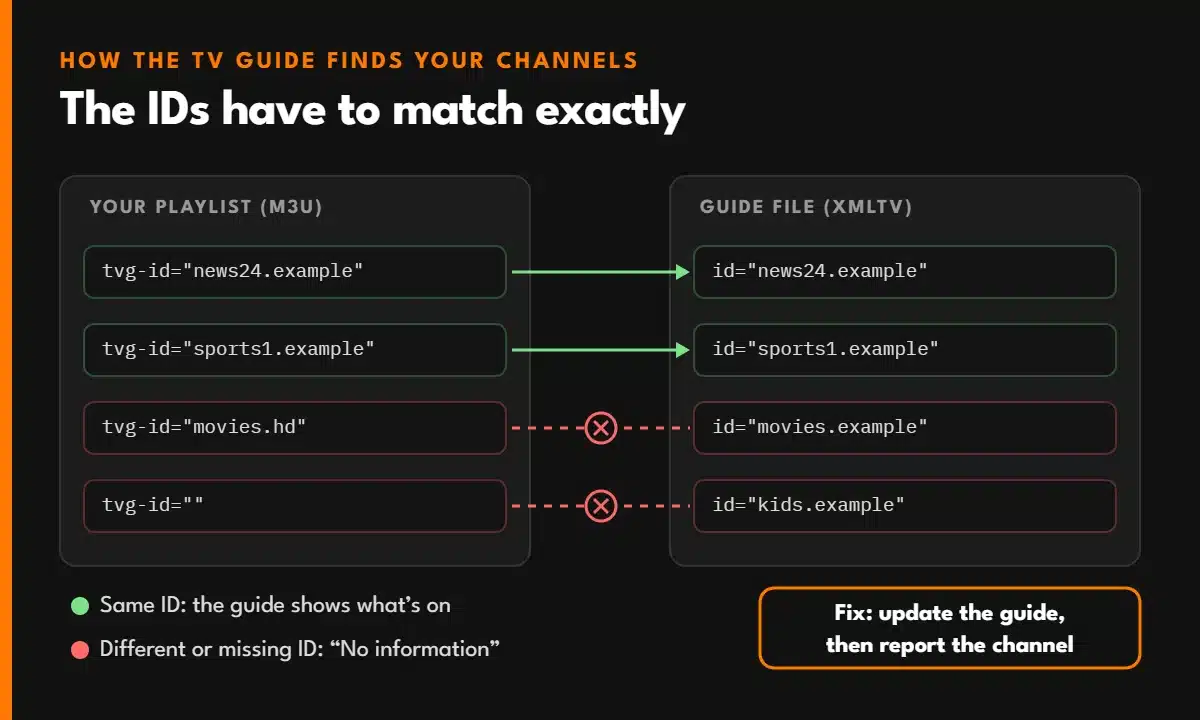
This is the part almost no guide explains, and it’s why so many “fixes” don’t work. The guide isn’t part of your channel list. It’s a separate file in a format called XMLTV, full of programme times, and your app has to match the two together.
Each channel in an M3U playlist carries a guide ID. A line in the playlist looks like this:
#EXTINF:-1 tvg-id="news24.example" tvg-name="News 24 HD" group-title="News",News 24 HD
The app takes news24.example and looks for a channel with exactly the same ID in the guide file. If it finds one, the programmes appear. If the ID is missing, misspelled or simply different, you get “No information”, even though the guide file has that channel’s schedule in it.
That’s why some channels can work perfectly while others next to them stay blank. It’s not your app or your internet. It’s a mismatch between two files, and it’s usually the provider’s job to fix.
If you log in with Xtream Codes (server, username and password), most apps download the guide automatically. If you use an M3U link, you often need to add the guide link yourself. With most providers it follows this pattern:
http://example-server.com:8080/xmltv.php?username=JOHN2026&password=Ab12cd34
You don’t have to build it by hand. Paste your M3U link into our M3U link checker and it works out your guide link for you, with a copy button. Then add it to your app:
The first download can take a few minutes on a large channel list. Leave the app open and don’t judge the result until it has finished.
When only some channels are blank, the guide itself is working. Those channels just aren’t matched. Try these in order:
A channel showing another channel’s programmes is the same problem the other way round: its ID points to the wrong entry, often the version of the channel from another country, with a different schedule.
If the programmes are right but at the wrong times, check these three things, in this order:
Clocks go back in most of Europe on Sunday, 25 October 2026, and in the US and Canada on Sunday, 1 November 2026. Guides can be an hour out for a day or two around these dates. Update the guide first, and only touch the time shift if it’s still wrong after that, or you’ll be an hour out the other way once it corrects itself.
A guide only covers the next few days. If your app stops updating it, the schedule simply runs out, usually after one to three days.
If it still runs out every few days, the provider’s guide may only cover a short period. That’s worth asking about, because a good service keeps several days ahead.
A provider with tens of thousands of channels can have a guide file that’s very large. On an older Firestick or a low-memory TV box, the app can freeze while it processes it, or give up halfway, leaving the guide half empty.
You’ve added the right link, the device time is correct and the guide still has gaps. These signs point to the provider’s side:
A missing guide doesn’t stop channels from playing, but with thousands of channels it makes the service much harder to use. For other problems, IPTV not working on Firestick covers everything else, step by step.
A TV Guide That Works From Day One
Every Watch TV Direct plan includes an EPG link, an M3U link and an Xtream Codes login. A real person sends them on WhatsApp, usually within 5 minutes, and helps you set up the guide in your app.
See IPTV PlansEPG stands for Electronic Programme Guide: the TV guide that shows what’s on now and next on each channel. In IPTV it usually comes from a separate link in XMLTV format.
If it’s every channel, the app has no guide or hasn’t finished loading it. If it’s only some channels, their IDs don’t match the guide. Update the guide first, then report the specific channels to your provider.
Usually because the clocks have changed for daylight saving and the guide hasn’t caught up, or because a time shift setting is wrong. Update the guide first, then check the device time zone, and only then adjust the time shift.
Usually not. Most apps download the guide automatically with an Xtream Codes login. With an M3U link you often need to add the guide link separately.
From a few seconds to several minutes the first time, depending on the number of channels and the device. After that, updates are much quicker.
© 2026 Watch TV Direct, Inc. All rights reserved.